Identify the reference points to start breaking the shot down into a series of thumbnail images and learn to avoid the common errors while animating a character.
Aaron Blaise’s Approach to Animating a Scene
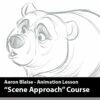

Creature Art Teacher Course
Animate a scene from start to finish.
Learn how professional animators approach and plan animated scenes.
In this course, Aaron Blaise walks through his approach to tackling an animated scene and creates new original animation as he explains his process.
You’ll get 6 HD tutorial videos covering scene approach, thumbnailing, sketching, character design, pose tests, animating dialogue, mouth shapes, breakdowns, in-betweens, arcs, and a complete animation demonstration.
6 HD Videos
Scene Approach
Dialogue Animation
With Aaron Blaise
Scene Approach
Dialogue Animation
With Aaron Blaise
Plan the Scene
Learn Aaron’s approach to scene planning, thumbnailing, sketching, character design, and pose tests.
Animate Dialogue
Study animating dialogue, mouth shapes, acting choices, and how performance decisions shape a scene.
Breakdowns & In-Betweens
See how the fundamentals of animation apply to a full scene, including breakdowns, in-betweens, arcs, and a complete demonstration.
Meet Aaron Blaise
Learn from the Oscar-nominated director of Brother Bear and veteran Disney animator whose credits include The Lion King, Aladdin, Beauty and the Beast, Mulan, and Pocahontas.
Lessons
02 Pose Test
Start adding drawings between your rough pose thumbnails, to flesh out animation.
03 Scene Review
Review the scene for accuracy before continuing, it is important to make sure things are working before committing to the timely process of animating the scene.
04 Mouth Shapes
Aaron guides you from pose test to hitting the dialogue keys so you can animate what you’re hearing.
05 Breakdowns, Inbetweens and Arcs
Learn the difference between “breakdowns” and “in-betweens” and implement them into your animation; also see how arcs can be use in multiple ways.
06 Animation Demonstration
Recap what you learned and apply it, animating a scene, following the full process from beginning to end.